Build a fighting-game arena scene
Two fighters, a stage, a health-bar HUD and a round timer — and no game logic. Like the paddle game and bubble shooter tutorials, the scene's job is to hand later code well-named, class-tagged things to find and drive. Open the editor, open the Shell tab, and paste each block in order — or just load the finished fight.json (File → Open, or drop it on the viewport).
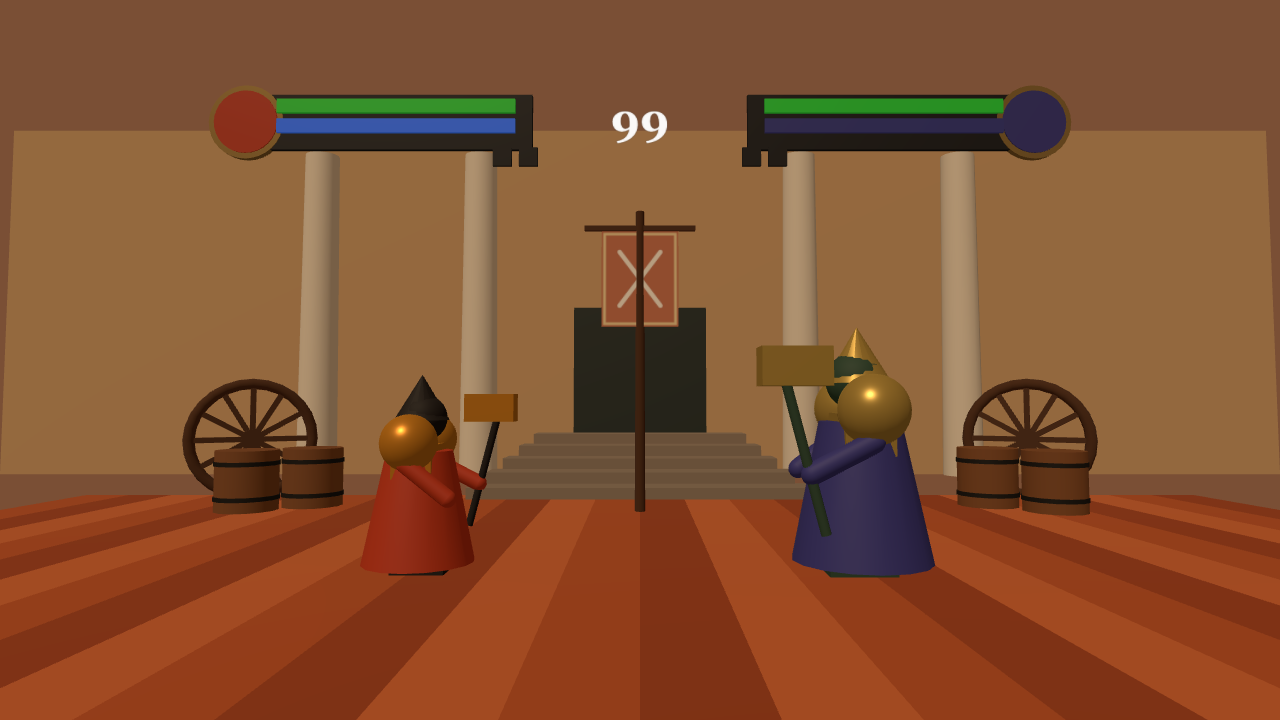
$S('.p1') and $S('.p2') for the fighters, P1 Health Fill / P2 Health Fill meshes whose scale.x is the bar, and a Round Timer plane. Hit boxes, moves and AI would be guesses at rules nobody has written yet.clearScene() first.1 Build the arena
One Group holds the plank floor (planks run along the depth axis, so the camera sees them converge), a plaster back wall with a doorway, stairs, pillars, two wagon wheels, four barrels and the banner. A canvas-painted texture draws the crossed swords — no image files. One AddObjectCommand adds the whole group, so it is one undo step:
const arena = new Group();
arena.name = 'Fighting Arena';

const plankMats = [ 0xb5562a, 0x9c4521, 0xc8693a ].map(c => new MeshStandardMaterial({ color: c, roughness: 0.75 }));
const floor = new Group();
floor.name = 'Stage Floor';
for (let i = 0; i < 26; i++) {
  const plank = new Mesh(new BoxGeometry(1.15, 0.2, 18), plankMats[i % 3]);
  plank.name = 'Plank ' + (i + 1);
  plank.position.set(-14.375 + i * 1.15, -0.1, 0);
  plank.receiveShadow = true;
  floor.add(plank);
}
arena.add(floor);

const stoneMat = new MeshStandardMaterial({ color: 0x8a7d70, roughness: 0.9 });
const plasterMat = new MeshStandardMaterial({ color: 0xc9a67a, roughness: 0.9 });
const darkWood = new MeshStandardMaterial({ color: 0x4a2c18, roughness: 0.85 });
const whiteStone = new MeshStandardMaterial({ color: 0xe6e0d4, roughness: 0.6 });

const wall = new Mesh(new BoxGeometry(44, 12, 0.6), plasterMat);
wall.name = 'Back Wall'; wall.position.set(0, 6, -15);
arena.add(wall);

const doorway = new Mesh(new BoxGeometry(4.5, 5, 0.7), new MeshStandardMaterial({ color: 0x1a2a2a, roughness: 0.6 }));
doorway.name = 'Doorway'; doorway.position.set(0, 3.2, -14.6);
arena.add(doorway);

for (let i = 0; i < 5; i++) {
  const step = new Mesh(new BoxGeometry(9 - i * 0.6, 0.3, 1.1), stoneMat);
  step.name = 'Stair ' + (i + 1);
  step.position.set(0, 0.15 + i * 0.3, -8.6 - i * 1.0);
  arena.add(step);
}

[-5.5, 5.5, -11, 11].forEach((x, i) => {
  const pillar = new Mesh(new CylinderGeometry(0.55, 0.65, 11, 16), whiteStone);
  pillar.name = 'Pillar ' + (i + 1); pillar.position.set(x, 5.5, -14.4);
  pillar.castShadow = true;
  arena.add(pillar);
});

// Wagon wheels and barrels flank the stage
function makeWheel(name, x, z, ry) {
  const wheel = new Group();
  wheel.name = name;
  const rim = new Mesh(new TorusGeometry(1.5, 0.14, 8, 28), darkWood);
  wheel.add(rim);
  const hub = new Mesh(new CylinderGeometry(0.28, 0.28, 0.3, 12), darkWood);
  hub.rotation.x = Math.PI / 2;
  wheel.add(hub);
  for (let i = 0; i < 6; i++) {
    const spoke = new Mesh(new BoxGeometry(0.14, 3, 0.12), darkWood);
    spoke.rotation.z = i * Math.PI / 6;
    wheel.add(spoke);
  }
  wheel.position.set(x, 1.5, z); wheel.rotation.y = ry;
  return wheel;
}
arena.add(makeWheel('Wagon Wheel Left', -10.5, -9, 0.5));
arena.add(makeWheel('Wagon Wheel Right', 10.5, -9, -0.5));

const barrelMat = new MeshStandardMaterial({ color: 0x7a4a26, roughness: 0.8 });
const bandMat = new MeshStandardMaterial({ color: 0x2a2a2a, roughness: 0.5, metalness: 0.6 });
[[-8, -7], [-9.2, -6.2], [8.5, -7], [9.6, -6]].forEach(([x, z], i) => {
  const barrel = new Group();
  barrel.name = 'Barrel ' + (i + 1);
  const body = new Mesh(new CylinderGeometry(0.7, 0.7, 1.4, 14), barrelMat);
  body.position.y = 0.7; body.castShadow = true;
  barrel.add(body);
  [0.3, 1.1].forEach(y => {
    const band = new Mesh(new CylinderGeometry(0.72, 0.72, 0.1, 14), bandMat);
    band.position.y = y;
    barrel.add(band);
  });
  barrel.position.set(x, 0, z);
  arena.add(barrel);
});

// Centre banner: pole, crossbar, canvas-painted crossed swords
const pole = new Mesh(new CylinderGeometry(0.1, 0.12, 7, 8), darkWood);
pole.name = 'Banner Pole'; pole.position.set(0, 3.5, -6);
pole.castShadow = true;
arena.add(pole);
const crossbar = new Mesh(new BoxGeometry(2.6, 0.12, 0.12), darkWood);
crossbar.name = 'Banner Crossbar'; crossbar.position.set(0, 6.6, -6);
arena.add(crossbar);
const bc = document.createElement('canvas');
bc.width = 256; bc.height = 320;
const bx = bc.getContext('2d');
bx.fillStyle = '#8c2f1a'; bx.fillRect(0, 0, 256, 320);
bx.strokeStyle = '#d9b36a'; bx.lineWidth = 8; bx.strokeRect(10, 10, 236, 300);
bx.strokeStyle = '#f2f2f2'; bx.lineWidth = 14; bx.lineCap = 'round';
bx.beginPath(); bx.moveTo(60, 70); bx.lineTo(196, 250); bx.moveTo(196, 70); bx.lineTo(60, 250); bx.stroke();
const banner = new Mesh(new PlaneGeometry(1.8, 2.25), new MeshStandardMaterial({ map: new THREE.CanvasTexture(bc), roughness: 0.9, side: THREE.DoubleSide }));
banner.name = 'Banner'; banner.position.set(0, 5.4, -5.95);
arena.add(banner);

arena.traverse(o => { if (o.isMesh && !o.name.startsWith('Plank')) o.receiveShadow = true; });
editor.execute(new AddObjectCommand(editor, arena));
2 Place two fighters
The fighters are deliberately primitive stand-ins — swap in real models later and keep the names and classes. The important detail is the axis: build each fighter facing +z (shoulders and boots on local ±x), then turn the whole group with rotation.y. Rotating by ±π/2 makes local +z point along world ±x, so the two face each other across the stage. Fighter 2 is scaled 1.25 so they read as different sizes. Tag each with a shared .fighter class plus .p1 / .p2:
function makeFighter(name, o) {
  const f = new Group();
  f.name = name;
  const robe = new MeshStandardMaterial({ color: o.robe, roughness: 0.6 });
  const trim = new MeshStandardMaterial({ color: o.trim, roughness: 0.35, metalness: 0.5 });
  const dark = new MeshStandardMaterial({ color: o.dark, roughness: 0.7 });
  const add = (mesh, n, x, y, z) => { mesh.name = n; mesh.position.set(x, y, z); mesh.castShadow = true; f.add(mesh); return mesh; };

  add(new Mesh(new CylinderGeometry(0.5, 0.85, 1.7, 16), robe), 'Robe', 0, 0.95, 0);
  add(new Mesh(new BoxGeometry(1.0, 0.5, 0.6), trim), 'Chest Plate', 0, 1.65, 0);
  add(new Mesh(new SphereGeometry(0.42, 16, 16), trim), 'Shoulder Left', -0.6, 1.95, 0);
  add(new Mesh(new SphereGeometry(0.42, 16, 16), trim), 'Shoulder Right', 0.6, 1.95, 0);
  add(new Mesh(new SphereGeometry(0.36, 16, 16), dark), 'Head', 0, 2.3, 0.05);
  add(new Mesh(new ConeGeometry(0.42, 0.7, 16), o.hood ? dark : trim), o.hood ? 'Hood' : 'Helm', 0, 2.62, 0.02);
  add(new Mesh(new CapsuleGeometry(0.13, 0.8, 4, 8), robe), 'Arm Left', -0.75, 1.4, 0.3).rotation.x = -0.9;
  add(new Mesh(new CapsuleGeometry(0.13, 0.8, 4, 8), robe), 'Arm Right', 0.75, 1.4, 0.4).rotation.x = -1.1;
  add(new Mesh(new CylinderGeometry(0.06, 0.06, 2.0, 8), dark), 'Weapon Shaft', 0.75, 1.5, 0.85).rotation.x = 0.25;
  add(new Mesh(new BoxGeometry(0.45, 0.45, 0.8), trim), 'Weapon Head', 0.75, 2.45, 0.95);
  add(new Mesh(new BoxGeometry(0.4, 0.18, 0.8), dark), 'Boot Left', -0.3, 0.09, 0.1);
  add(new Mesh(new BoxGeometry(0.4, 0.18, 0.8), dark), 'Boot Right', 0.3, 0.09, 0.1);

  f.position.set(o.x, 0, 0);
  f.rotation.y = o.facing;
  f.scale.setScalar(o.scale);
  return f;
}

const fighter1 = makeFighter('Fighter 1', { x: -3.4, facing: Math.PI / 2, scale: 1.0, robe: 0xb8391c, trim: 0xf0a030, dark: 0x1e1a1a, hood: true });
const fighter2 = makeFighter('Fighter 2', { x: 3.4, facing: -Math.PI / 2, scale: 1.25, robe: 0x3a3a8c, trim: 0xd6b45a, dark: 0x2e4a3a, hood: false });
editor.execute(new AddObjectCommand(editor, fighter1));
editor.execute(new AddObjectCommand(editor, fighter2));
tagClass(fighter1, 'fighter'); tagClass(fighter1, 'p1');
tagClass(fighter2, 'fighter'); tagClass(fighter2, 'p2');3 Add the HUD
The HUD is a 3D group hung behind the fighters, not a screen overlay — so it is scaled (0.78) until both portraits fit inside the camera frustum. Each bar fill's geometry is translated so its origin sits on the portrait-side edge; later code only has to set fill.scale.x between 0 and 1 and the bar drains toward the centre, with no position math:
// Fills have their geometry origin on the portrait-side edge, so game logic can
// just set fill.scale.x (0..1) and the bar drains toward the centre.
const hud = new Group();
hud.name = 'HUD';
hud.position.set(0, 8.4, -4);
hud.scale.setScalar(0.78);
const gold = new MeshStandardMaterial({ color: 0xd9b36a, roughness: 0.35, metalness: 0.7 });
const slot = new MeshStandardMaterial({ color: 0x15171c, roughness: 0.6 });
const emissive = c => new MeshStandardMaterial({ color: c, emissive: c, emissiveIntensity: 0.35, roughness: 0.5 });

function makeHudSide(prefix, sign, healthColor, manaColor, portraitColor) {
  const side = new Group();
  side.name = prefix + ' HUD';
  const frame = new Mesh(new BoxGeometry(7.4, 1.5, 0.15), slot);
  frame.name = prefix + ' Frame'; frame.position.set(sign * 6.6, 0, 0);
  side.add(frame);
  const barW = 6.4, edge = sign * 9.75;
  [['Health', 0.42, healthColor], ['Mana', -0.12, manaColor]].forEach(([n, y, c]) => {
    const g = new BoxGeometry(barW, 0.38, 0.1);
    g.translate(-sign * barW / 2, 0, 0);
    const fill = new Mesh(g, emissive(c));
    fill.name = prefix + ' ' + n + ' Fill'; fill.position.set(edge + 0, y, 0.12);
    side.add(fill);
  });
  const ring = new Mesh(new CylinderGeometry(1.0, 1.0, 0.18, 32), gold);
  ring.name = prefix + ' Portrait Ring'; ring.rotation.x = Math.PI / 2; ring.position.set(sign * 10.6, 0, 0);
  side.add(ring);
  const face = new Mesh(new CylinderGeometry(0.85, 0.85, 0.2, 32), new MeshStandardMaterial({ color: portraitColor, roughness: 0.5 }));
  face.name = prefix + ' Portrait'; face.rotation.x = Math.PI / 2; face.position.set(sign * 10.6, 0, 0.02);
  side.add(face);
  [0, 1].forEach(i => {
    const gem = new Mesh(new BoxGeometry(0.5, 0.5, 0.1), slot);
    gem.name = prefix + ' Round Slot ' + (i + 1); gem.position.set(sign * (3.0 + i * 0.7), -0.95, 0.05);
    side.add(gem);
  });
  return side;
}
const hudP1 = makeHudSide('P1', -1, 0x22a82a, 0x2a5fd9, 0xb8391c);
const hudP2 = makeHudSide('P2', 1, 0x22a82a, 0x2a2a60, 0x3a3a8c);
hud.add(hudP1); hud.add(hudP2);

const tc = document.createElement('canvas');
tc.width = 256; tc.height = 160;
const tx = tc.getContext('2d');
tx.clearRect(0, 0, 256, 160);
tx.textAlign = 'center'; tx.textBaseline = 'middle';
tx.fillStyle = '#ffffff'; tx.font = 'bold 120px Georgia'; tx.fillText('99', 128, 84);
const timer = new Mesh(new PlaneGeometry(2.6, 1.6), new MeshBasicMaterial({ map: new THREE.CanvasTexture(tc), transparent: true }));
timer.name = 'Round Timer'; timer.position.set(0, 0, 0.1);
hud.add(timer);
editor.execute(new AddObjectCommand(editor, hud));
tagClass(hud, 'hud');
4 Light the stage and set the mood
Warm ambient fill, a shadow-casting key light, exponential fog and a clay-coloured background:
editor.execute(new AddObjectCommand(editor, new AmbientLight(0xffd9b0, 0.7)));
const sun = new DirectionalLight(0xffe2bb, 1.6);
sun.name = 'Key Light'; sun.position.set(-6, 14, 10);
sun.castShadow = true;
sun.shadow.camera.left = -14; sun.shadow.camera.right = 14; sun.shadow.camera.top = 12; sun.shadow.camera.bottom = -12;
editor.execute(new AddObjectCommand(editor, sun));
setFog('FogExp2', '#8a5a3a', 0, 0, 0.012);
setBackground('#7a4f35');
5 Stand the camera at the front of the stage
A low, close camera makes the fighters feel large. The same technique as the other tutorials — set the position, aim it, and update the controls' centre so orbiting pivots around the action:
const cam = editor.camera;
cam.position.set(0, 2.6, 12);
cam.fov = 50;
cam.lookAt(0, 3.2, 0);
cam.updateProjectionMatrix();
editor.controls.center.set(0, 3.2, 0);
editor.signals.cameraChanged.dispatch(cam);
editor.signals.objectChanged.dispatch(cam);
6 Sanity-check before handing off
Confirm the things later game code depends on, rather than eyeballing the viewport. The last two lines prove the bar anchors correctly — at half scale the left edge stays put and only the right edge moves:
$S('.fighter').count();              // 2
$S('.p1').count();                   // 1
const fill = findObject('P1 Health Fill');
const bounds = () => { fill.updateMatrixWorld(true); const b = new THREE.Box3().setFromObject(fill); return [b.min.x, b.max.x]; };
fill.scale.x = 1;   bounds();        // [-7.61, -2.61]
fill.scale.x = 0.5; bounds();        // [-7.61, -5.11]  (left edge pinned)
fill.scale.x = 1;                    // put it back
7 Save it as fight.json
Use File → Save (the disk icon) to download the project as JSON, or load the ready-made one: fight.json. Opening it restores the names, the .fighter / .p1 / .p2 / .hud classes, the painted textures, the fog and the camera exactly as built here. Drop the file on the viewport, or use File → Open.
Credits and licences
People
- Tejaswi Gowda (script, scene)
Assets
None used.
Tools
None used.